

OpenAPI Integration
Prerequisites
Construct Signature to Get Token
When integrating with the duix-openapi-v2 platform, you need to integrate code to generate tokens in your own platform. The method for generating tokens can be referenced in the following code: How to Get TokenManagement Interfaces
Management-type HTTP requests have a common convention that requires passing a token in the request header.Interaction Process
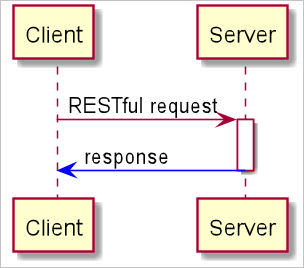
Get APP Real-time Concurrent Number
Interface Address:
/duix-openapi-v2/sdk/v2/getconcurrentNumberRequest Method: GET
Interface Description:
Query the concurrent number under a specific APP
Parameter Description
Response Parameters:
Response Example:
Get APP Real-time Sessions
Interface Address:
/duix-openapi-v2/sdk/v2/getconcurrentListRequest Method: GET
Interface Description:
Query the list of “in call” sessions under a specific APP.Parameter Description
Close All Sessions of an APP
Interface Address:
/duix-openapi-v2/sdk/v2/distroyCallSessionsByAppIdRequest Method: GET
Interface Description:
Close all sessions under a specific APPParameter Description
Response Example:
Close Specified Session
Interface Address:
/duix-openapi-v2/sdk/v2/sessionStopRequest Method: GET
Parameter Description
Third-party Dialog Integration (Non-streaming)
Other Session Integration: Other session platforms can be provided for digital humans to use in the following way. The DUIX platform can, through your digital human, use the POST method to request a remote URL you define to get answers to questions.
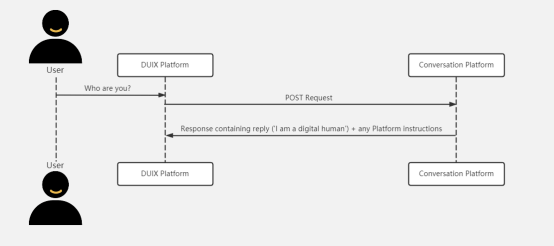
Session Platform Integration Example: You can refer to this example of session platform integration. This open-source application implements a dialogue platform integration, which implements casual conversation functionality.
Request Specification: The DUIX platform will send question requests (questions customers ask your digital human) in the following format via POST to your remote URL.
Parameter Description
Request Example:
Valid Response Types:
Response Body Specification:
Third-party Dialog Integration (Streaming)
Other Session Integration: Other session platforms can be provided for digital humans to use in the following way. The DUIX platform can, through your digital human, use the POST method to request a remote URL you define to get answers to questions.

Session Platform Integration Example: You can refer to this example of session platform integration. This open-source application implements a dialogue platform integration, which implements casual conversation functionality.
Request Specification: The DUIX platform will send question requests (questions customers ask your digital human) in the following format via POST to your remote URL.
Parameter Description
Request Example:
Get Conversation Details
Interface Address:
/duix-openapi-v2/sdk/getConversationById?conversationId=[duix platform conversation id]Request Method: GET
Interface Description:
Query conversation details based on the conversation id created by the duix platform
Parameter Description
Response Parameters:
Response Example: